

SEO Audit Checklist: A Step-by-Step Guide for Beginners
An SEO audit checklist is a step-by-step list of checks that finds problems stopping your website from ranking in search. It covers four areas: technical health, on-page elements, content quality, and backlinks. Start with technical issues, fix the biggest problems first, and record what you find in a simple report.
Audit tools can show hundreds of warnings, but most are minor. A few can do real damage, like important pages blocked from Google or a very slow site. Knowing which issues matter most is what makes an audit useful.
This SEO audit guide covers nine SEO audit steps in a practical order. You will see which free tools to use, how to rank issues by priority, and how to turn your findings into an SEO audit report.
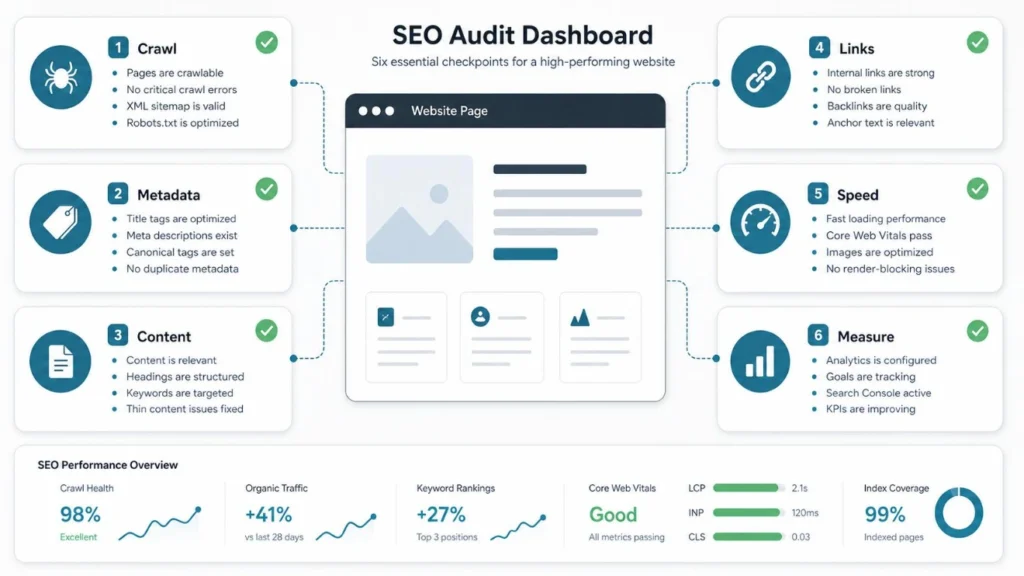
What Is an SEO Site Audit?
An SEO site audit is a health check for your website. You review how easily search engines can find and understand your pages. You also review how useful those pages are for real people. The result is a list of problems, each with a fix and a priority.
You may also hear it called a website SEO analysis or a website audit checklist. The names differ, but the job is the same. You look at your site the way a search engine and a visitor would, then fix what gets in the way.
Most audits cover these four areas:
- Technical: Can search engines crawl and index your pages?
- On-page: Do titles, headings, and images help people and search engines?
- Content: Do your pages meet the needs of the people searching?
- Off-page: Do other trusted sites link to you?
What You Need Before You Start
You do not need paid software to begin. A free SEO audit checklist works well when paired with a few free tools. Here are the main SEO audit tools beginners use. You can also explore our free SEO tools to analyze your website and identify potential SEO issues.
Tool | What it helps you check |
Google Search Console | Indexing problems, search queries, mobile issues, manual actions |
Google Analytics (GA4) | Which pages get traffic and which ones do not |
PageSpeed Insights | Page speed and Core Web Vitals |
A site crawler (such as Screaming Frog) | Broken links, redirects, missing titles, duplicate pages |
Bing Webmaster Tools | Bing indexing and crawl reports |
Verify your site in Google Search Console first. Google recommends it for finding and diagnosing technical problems, and it is the best source of data about your own site.
SEO Audit Checklist: Step by Step
Follow the steps below in order. Start with technical problems because nothing else matters if search engines cannot reach your pages.
Step 1: Check Crawling and Indexing
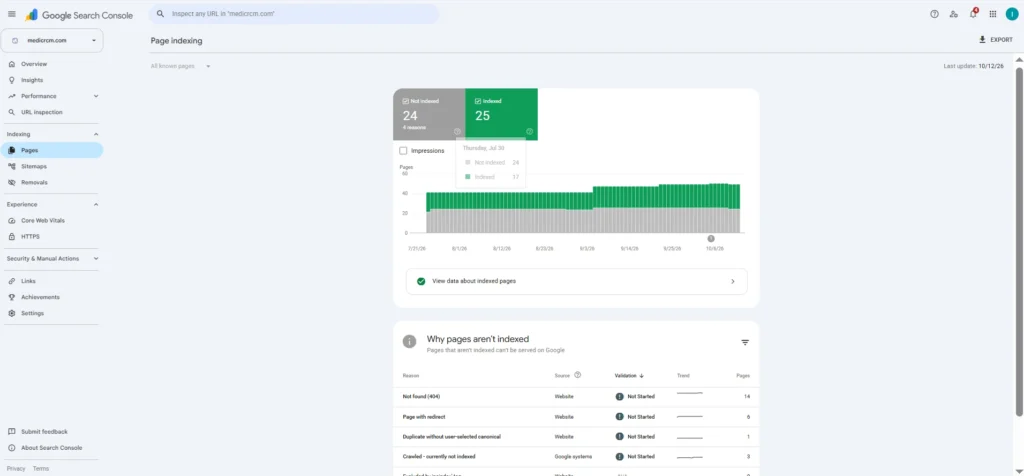
This is the first item on any technical SEO audit checklist. If Google cannot crawl or index a page, that page cannot appear in search results. Open the Page indexing report in Search Console and look at which pages are not indexed and why.
Then run through these checks:
- Open yoursite.com/robots.txt and make sure you are not blocking important pages by mistake.
- Look for stray noindex tags on pages that should rank.
- Confirm you have an XML sitemap, and that it lists only pages you want indexed.
- Search site:yoursite.com in Google for a rough count of indexed pages.
Step 2: Review Site Structure and URLs
Next, look at how your pages connect. A clear structure helps visitors and search engines find content. Important pages should be reachable within a few clicks from the homepage, and every page should have at least one internal link pointing to it.
Check that your URLs are short, readable, and consistent. Look for duplicate versions of the same page, such as http and https, or versions with and without www. Use canonical tags to point duplicates to the main version. Also fix redirect chains, where one URL jumps through several others before landing, because they waste crawl effort and slow pages down.
Step 3: Test Speed and Core Web Vitals
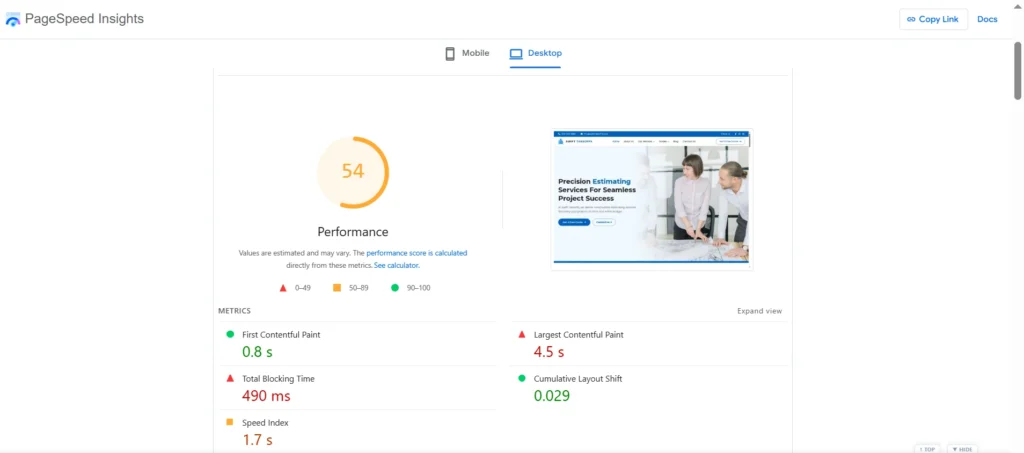
A website technical audit should include page experience. Core Web Vitals are Google’s three main measures: Largest Contentful Paint (loading), Interaction to Next Paint (responsiveness), and Cumulative Layout Shift (visual stability). INP replaced First Input Delay as a Core Web Vital on March 12, 2024.
The “good” targets are an LCP of 2.5 seconds or less, an INP of 200 milliseconds or less, and a CLS of 0.1 or less, measured at the 75th percentile of real users. Test your key pages in PageSpeed Insights and note which metric fails. Keep this in perspective, though. Google’s own documentation says page experience has no single signal, so treat speed as one part of a healthy site and not a magic ranking lever.
Step 4: Check Mobile Friendliness and Security
Google mostly uses the mobile version of your pages for indexing. Open your site on a phone and check that text is readable, buttons are easy to tap, and nothing is cut off. Also compare your mobile and desktop content. Important text, images, and links should exist on both.
Then confirm your whole site loads over HTTPS with no mixed-content warnings. Check Search Console for any security issues or manual actions. These are rare, but they are serious when they appear.
Step 5: Run an On-Page SEO Audit
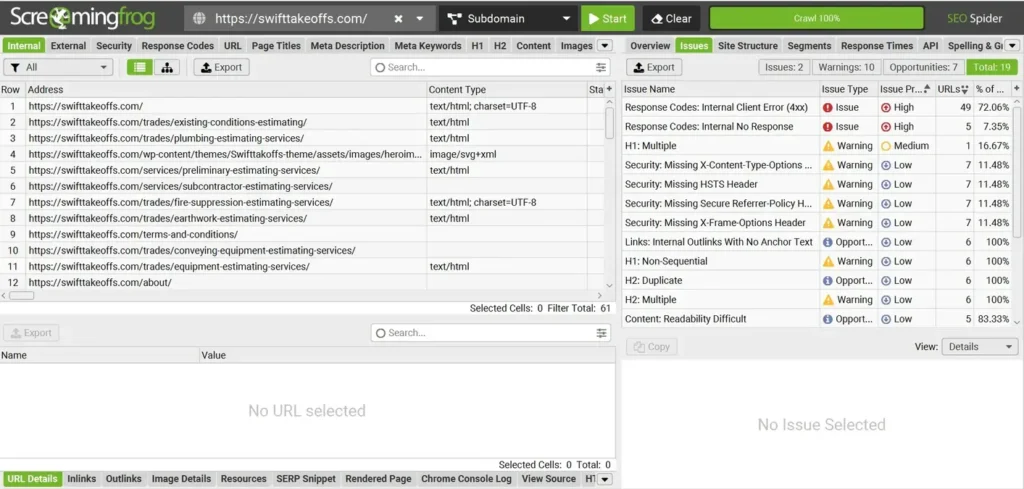
Now move to the pages themselves. This on-page SEO audit checklist is easy to complete with a crawler export. Look at each important page and check:
- Title tag: Is it unique, clear, and written for the page’s topic? Google may rewrite titles, but a good one still helps.
- Meta description: Does it describe the page honestly? It won’t directly boost rankings, but it can improve clicks.
- Headings: Does each page have one clear H1 and a logical H2 and H3 structure?
- Images: Do they have useful alt text and reasonable file sizes?
- Internal links: Do they use descriptive anchor text and point to relevant pages?
Fix missing and duplicate titles first, since they are quick wins.
Step 6: Complete a Content SEO Audit
A content SEO audit asks whether each page deserves to rank. Export your pages with traffic data from Search Console or GA4. Then sort them into four groups: keep, update, merge, or remove.
Look for thin pages with little useful information. Look for outdated posts with old facts or broken advice. Look for pages that compete for the same keyword, which can split your results between them. For each important page, ask whether it matches what the searcher wants. A person searching for a how-to guide will not be satisfied by a sales page. Original examples, clear answers, and real experience make a page stronger than one that repeats what everyone else says.
Step 7: Do a Backlink Audit
A backlink audit reviews the sites that link to you. Use Search Console’s Links report for a free view. Paid tools can show more, but you can learn a lot from the free data.
Check which pages earn the most links, which sites link to you, and whether the anchor text looks natural. Also look for broken backlinks, where another site links to a page on your site that no longer exists. Redirect those URLs to the closest relevant page to keep the value. The disavow tool is an advanced feature, so do not use it unless you have a clear reason, such as a pattern of spammy links you did not create.
Step 8: Check AI Search Readiness (New for 2026)
Many readers now ask about visibility in AI answers. The good news is that you do not need a separate strategy. Google’s documentation says no specific optimization is required for AI Overviews and AI Mode, and that normal SEO fundamentals still apply. Those include internal links that make content easy to find, quality images and video, and structured data that matches the visible text.
So for this step, check the basics. Make sure your important pages are indexed and readable as plain text. Review your robots.txt rules, and block AI crawlers only if you mean to. Add original information that other pages lack. No one can promise citations or rankings from AI platforms, so avoid any guide that does.
To see how your brand currently appears in AI answers, you can try RankFable’s AI visibility checker.
Step 9: Prioritize and Fix Issues
You will finish with a long list. Sort it so you fix the right things first. Use this simple system:
Priority | Examples | When to fix |
High | Blocked pages, noindex errors, site-wide broken pages, security issues | Right away |
Medium | Slow pages, duplicate titles, redirect chains, thin content | Within weeks |
Low | Minor alt-text gaps, small formatting issues | When time allows |
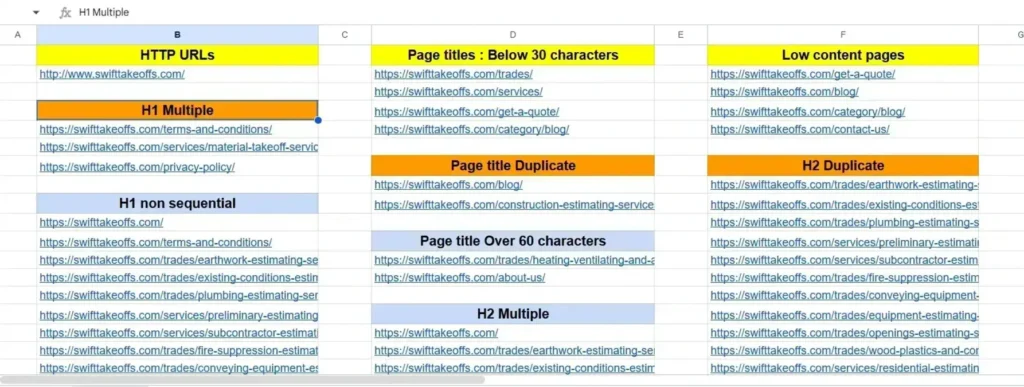
How to Build an SEO Audit Report
An SEO audit report turns your findings into a plan. It does not need to be fancy. A spreadsheet or short document works if it is clear. If you use an SEO audit template, keep it simple and focused on action.
Include these parts:
- Summary: Two or three sentences on the site’s overall health.
- Issues found: Each issue with the affected URLs and where you found it.
- Priority: High, medium, or low.
- Fix: What to do, in plain words.
- Owner and status: Who will do it and whether it is done.
Save a copy each time you audit. Comparing reports over time shows what improved and what slipped.
Common SEO Audit Mistakes to Avoid
The biggest mistake is treating every warning as equal. A missing alt tag on one image is not the same as a blocked section of your site. Another common error is auditing once and never returning. Websites change, and so do search engines.
Beginners also tend to fix things without checking the data first. Always confirm that a problem is real in Search Console or your analytics before you spend hours on it. Finally, do not chase perfect scores from tools. A tool grade is a guide, not the goal. The goal is a site that people can find and use.
FAQs About the SEO Audit Checklist
How often should I run an SEO audit?
Most sites benefit from a full audit once or twice a year. Check Search Console monthly for new problems. Run an extra audit after a redesign, a site move, a big traffic drop, or a major content change.
How long does an SEO audit take?
A small site of a few dozen pages can take a few hours. A large site with thousands of pages can take days or weeks. Your site’s size and the depth of your review determine the time.
Can I do an SEO audit myself?
Yes. Beginners can complete this checklist with free tools. You may want an expert for complex issues like migrations, international setups, or large-scale technical problems.
What is the difference between a technical and an on-page audit?
A technical audit examines how search engines access your site, including crawling, indexing, speed, and security. An on-page audit looks at what is on each page, such as titles, headings, content, and images.
Is there a free SEO audit checklist I can use?
Yes. This article is one, and you can copy the steps into a spreadsheet. Pair it with Google Search Console and PageSpeed Insights, which are both free.
Conclusion: Start With the Biggest Problems
Use this SEO audit checklist as a repeatable routine. Begin with crawling and indexing, move through speed, on-page elements, content, and backlinks, and finish by ranking your fixes. Small, steady improvements usually beat one giant cleanup.
Your next step is simple: open Search Console and check the Page indexing report today. If you want help running the checks, [insert the relevant RankFable SEO tool name and verified URL here] can support your website SEO analysis. You can also explore related RankFable guides on technical SEO and on-page SEO.