

SEO Competitor Analysis: How to Find and Learn From Your Rivals
Say you want to rank for a search term, but someone else always seems to be sitting at the top. SEO competitor analysis is how you figure out why. You find the sites that rank for your target searches, look at the keywords and pages that bring them visitors, and compare all of that with your own site. What you walk away with is a short to-do list of topics to write, pages to fix, and keywords worth going after. Google and a spreadsheet are enough to get started, so you don’t need pricey software on day one.
Plenty of people skip this step and just guess. They publish what feels right, then watch a site they’ve never heard of grab the top spot. Odds are that site isn’t a business rival at all. It might be a blog, a forum, or a big marketplace that simply answers the search better than you do. Looking at what those pages offer usually points to a fix you can make this month, and that’s the real payoff.
This guide walks you through the whole routine, one step at a time. You’ll find your real rivals, pull their keywords, compare content, check AI search results, and pick what to work on first. Along the way there’s a worked example, a quick way to see what competitors bid on, and a report template you can copy into a spreadsheet.
What Is SEO Competitor Analysis?
SEO competitor analysis is a close look at the sites that win the searches you want. You check their keywords, their top pages, the sites linking to them, and how they show up in search and AI answers. Then you put that next to your own site. It’s one piece of competitive analysis, which covers rivals across products, pricing, and sales. The SEO version sticks to one question: why are they ahead of me in search, and what can I do about it?
Before digging in, try a little competitor mapping. That’s a fancy name for a simple table: your rivals in one column and a note on what each does well in the next. Picture a small candle shop. Its table might list two other candle stores, a home-decor blog, and a big marketplace, since all four turn up for the same searches. One look at that list, and you know who you’re really up against.
How Do You Find Your SEO Competitors?
Start with Google itself. Open a private window and search five or six of your main keywords. Write down any domain that shows up more than once in the top results. Those are your SEO competitors, even if they sell something completely different. One catch: results change with location and device, so set your country first. Targeting the US? Check US results. Writing for readers all over the world? Run the same searches from a second country too.
Then cast the net a bit wider. Ask an AI search tool for the best options in your topic and see which brands come up. Skim a few roundup posts and review pages. Ask customers or your sales team who else they looked at. Paid tools have an organic competitors report too. When you have a list, sort it into three groups: direct (same product, same buyer), indirect (same problem, different solution), and aspirational (the big names you’d love to catch someday). Study three to five, mostly direct ones close to your size.
How to Do SEO Competitor Analysis Step by Step
Block out an afternoon for your first pass, and type what you find into a spreadsheet as you go. The second round goes much faster. Don’t wait for a perfect plan, either. A rough pass you actually finish beats a flawless one that never starts.
Step 1: Find Competitor Keywords
Competitor keyword research answers a simple question: what searches bring people to their pages? In a paid tool, type in a rival’s domain and open its organic keywords report. You’ll see the keywords, an estimate of monthly searches, and the page that ranks. Better still, a keyword gap report shows words your rivals rank for and you don’t, which is a goldmine of ideas. You’ll also hear this called competitive keyword analysis or keyword competitor analysis. Same job, different label.
No budget? You can still get a long way. Search Google for site:competitor.com plus a topic word to list their pages on that subject. Open their sitemap, which many sites keep at /sitemap.xml, and read the page titles and web addresses. Type your main keyword into Google and watch the autocomplete ideas and the People Also Ask box. Finally, open Search Console to see which searches already bring visitors to your own site.

Step 2: Compare Their Content
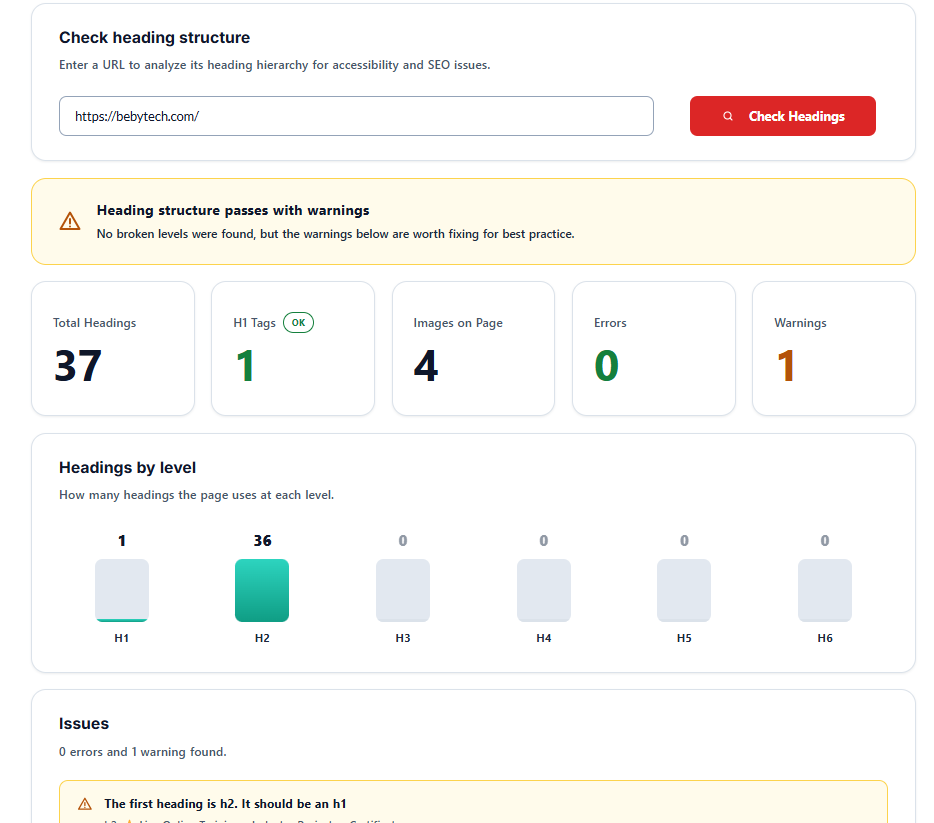
Now open the top page for each keyword and read it the way a visitor would. What kind of page is it: a guide, a list, a tool, a comparison? How deep does it go? Does it answer the question you’d ask next? Does it look current? Is it easy to scan? The Heading (H1 to H6) Checker can help you see how its headings are laid out, so you can tell which topics it covers and which it skips. Jot down one weakness for each page.
Look at titles and descriptions too. Write your own version and check it in the SERP Preview tool to see how it might look in search results. This isn’t about copying anyone. You’re hunting for pages that feel thin, dated, or confusing, because a clearer page from you has a real chance of taking that spot.
Step 3: Check Competitor Traffic and Backlinks
A heads-up before you look at traffic: numbers from third-party tools are estimates. Use them to compare sites, not as exact counts. Find each rival’s top pages, since those topics already work in your niche. Then see who links to them. A backlink gap report shows sites that link to your rivals but not to you. Resource lists, directories, and articles that mention tools like yours are good places to aim. Search Console shows links as well, but only for your own site.
Step 4: Look at AI Search Visibility
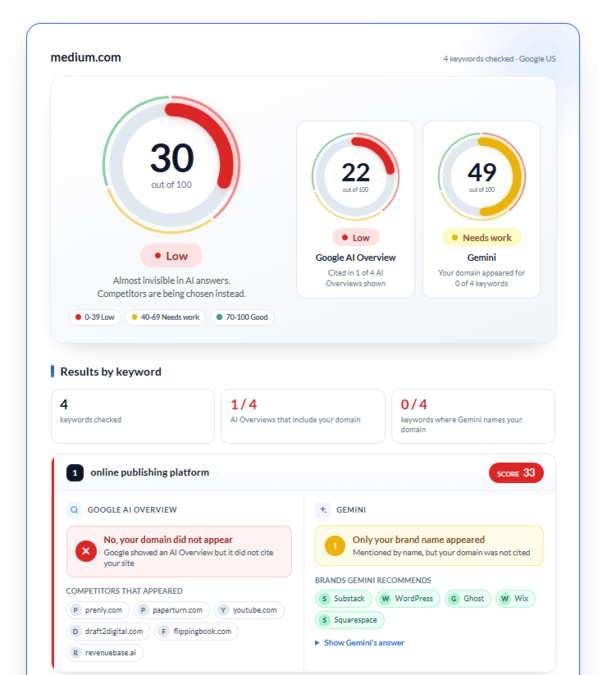
These days, plenty of people get their answers from AI results, so it pays to check those too. The AI Visibility Checker lets you enter any domain and see how visible it is in Google AI Overviews and Gemini, scored out of 100. Run it for your site and for each rival, and add the scores to your sheet. If a rival scores much higher, open its top pages and ask what they do better. Maybe the answers are clearer, or the details are fuller. Then improve your own pages the same way.
Step 5: Find Gaps and Pick Targets
Time to decide what to do. List every gap you found: keywords you don’t target, formats you don’t offer, questions you haven’t answered, and rival pages that look weak. Give each idea a score from 1 to 3 on three things: how well it fits your business, how closely it matches what searchers want, and how realistic it is to beat today’s results. Add them up and start with the highest totals. Choose three to five topics, not fifty, and give each one a deadline.
SEO Competitor Analysis Example: A Quick Walkthrough
A made-up example shows how the pieces fit together. Imagine a small store that sells soy candles and wants to rank for gift sets. Searching that phrase turns up two candle shops, a gift-guide blog, and a marketplace, so the store studies the shops and the blog. Their keyword reports show that both shops rank for candle care tips, a topic the store has never written about.
Next, the store reads those pages. One is short and out of date. The blog has a neat comparison table that the others don’t. So the plan comes together fast: write a better candle care guide, add a comparison table to the gift sets page, and run an AI visibility check on all four sites. One afternoon of research, three clear jobs.
What Keywords Are My Competitors Bidding On?
Want to know what keywords competitors are bidding on? Start by searching your keyword and looking at the ads. The brands at the top are paying for it. For a wider view, paid tools offer a paid keywords or PPC research report with estimated keywords and, often, the ad text. Google Ads also has an Auction Insights report, which shows which advertisers compete with you in your own campaigns. No tool reveals a rival’s exact bids or budget, so treat the numbers as clues. If a rival keeps paying for a term, it may be bringing in customers.
Free vs Paid Competitor Analysis Tools
Free competitor analysis tools cover the basics: Google search, the site: operator, autocomplete, Search Console for your own data, and RankFable’s AI visibility check. Paid SEO competitor analysis tools add large keyword databases, traffic estimates, backlink reports, and automatic tracking. With a few rivals and a small site, start free. Once your spreadsheet gets heavy, try a paid tool during its free trial and see if the data earns its price. Plans and limits change, so check the current terms.
How Do You Track Competitor Keywords Over Time?
Pick 10 to 20 keywords that matter most, then check the results once a month. An SEO competitor rank tracker can do this for you, and many paid tools include one. On a free budget, search by hand and log your position, each rival’s position, the date, the country, and the device, because rankings differ between them.
Each month, ask yourself four things. Did a rival publish something new? Did anyone jump up or drop for a keyword? Did an AI visibility score change? Did the results page add a new format, like a video or a table? Also make sure your own site is in good shape before you chase anyone. An SEO audit checklist can help you fix crawling, speed, and on-page problems first, so your new content gets a fair shot.
SEO Competition Report Sample: A Simple Template
Your SEO competition report can live on one spreadsheet tab. Use one row per competitor and keep the columns the same each month, so changes stand out. Think of it as a simple SEO competitor analysis template, and swap the bracketed placeholders for your own findings.

| Competitor | Main Topics | Best Page URL | Format | AI Visibility Score (/100) | Gap or Opportunity | Next Action |
|---|---|---|---|---|---|---|
| Competitor 1 | [Topics they cover] | [Page URL] | [Guide, list, or tool] | [Score out of 100] | [What they cover that you don’t] | [Update or write a page] |
| Competitor 2 | [Topics they cover] | [Page URL] | [Guide, list, or tool] | [Score out of 100] | [What they cover that you don’t] | [Update or write a page] |
| Competitor 3 | [Topics they cover] | [Page URL] | [Guide, list, or tool] | [Score out of 100] | [What they cover that you don’t] | [Update or write a page] |
Write a two-sentence summary above the table: what you learned and what you’ll do next. Keep the actions small, like adding a missing section to a guide or rewriting a weak title. Save a copy every month, and you’ll soon see which changes helped.
Common Mistakes to Avoid
A few mistakes come up a lot. Copying is the big one. If you only mirror a rival, you’ll land a close second at best, so answer the search more clearly and add your own examples. Another is going after keywords that are far too tough for your site right now. And try not to lean on a single number. Tool estimates differ, so look for patterns across several signals.
Conclusion
SEO competitor analysis boils down to a handful of habits: find your real rivals, study their keywords and content, check AI visibility, pick a few gaps, and track what happens. You don’t need to do it all at once. Three rivals and one spreadsheet make a solid first pass. And if you’d like a hand reading your results or deciding what to publish first, you can contact the RankFable team.
FAQ
What is the difference between competitive analysis and SEO competitor analysis?
Competitive analysis looks at rivals across the whole business: products, pricing, sales, and brand. SEO competitor analysis zooms in on search only, meaning the keywords, content, links, and visibility that help rival sites rank.
How do I find out what keywords my competitors are using?
Enter a rival’s domain in a keyword tool and open its organic keywords report. For a free route, search Google for site:domain.com plus a topic word, then read their page titles and headings.
How many competitors should I analyze?
Start with three to five. That’s enough to spot patterns without drowning in data. Stick mostly to direct competitors, and add one bigger site as a model if you like.
How often should I run a competitor analysis?
Do a full review a few times a year and a quick check once a month. Run an extra one if your traffic drops or a new rival shows up.
How do I compare my website to my competitors?
Use the same checklist for every site: keywords, top pages, content quality, links, and AI visibility. Put the results in one table, then pick the gaps you can close first.
Can I do competitor analysis for free?
Yes. Google search, site: searches, autocomplete, Search Console, and a free AI visibility check cover the basics. Paid tools mostly save time and add data like traffic estimates and backlink gaps.