

9 Best Free SEO Tools for Website Analysis
The best free SEO tools for website analysis are Google Search Console, Google PageSpeed Insights, Ahrefs’ free audit tools, and Screaming Frog. Together, they show how Google sees your site, what is broken, how fast your pages load, and which topics to write about next. You can find most SEO problems without paying for anything.
The hard part is not finding tools. It is knowing where to start. Many lists give you 20 or 30 names and leave you to guess. A small blog or business site does not need that many dashboards. It needs a few tools that each do one job well.
This guide covers nine free tools for website analysis. For each one, you will see what it checks, where the free plan runs out, and when it is worth using. At the end, there is a simple five-step routine you can follow this week.
Quick Comparison of the Best Free SEO Tools
These are the free website SEO analysis tools covered in this guide, with the main limit of each one.
Tool | Best for | Main free limit |
Google Search Console | Search clicks, queries, indexing | You must verify site ownership |
Google Analytics 4 | What visitors do after they arrive | Needs correct setup to be accurate |
Bing Webmaster Tools | Bing search data and site issues | Shows Bing only, not Google |
Ahrefs Free | Site audits for your own site | Only verified sites, monthly crawl credits |
Screaming Frog | Finding broken links and metadata issues | Free up to 500 URLs |
PageSpeed Insights | Speed and Core Web Vitals | One page at a time |
Rich Results Test | Checking structured data | Only Google-supported types |
Google Trends | Comparing topic interest over time | Relative interest, not exact volume |
AnswerThePublic / AlsoAsked | Question and content ideas | Limited free searches |
Free Tools to See How Your Website Performs in Search
Google Search Console
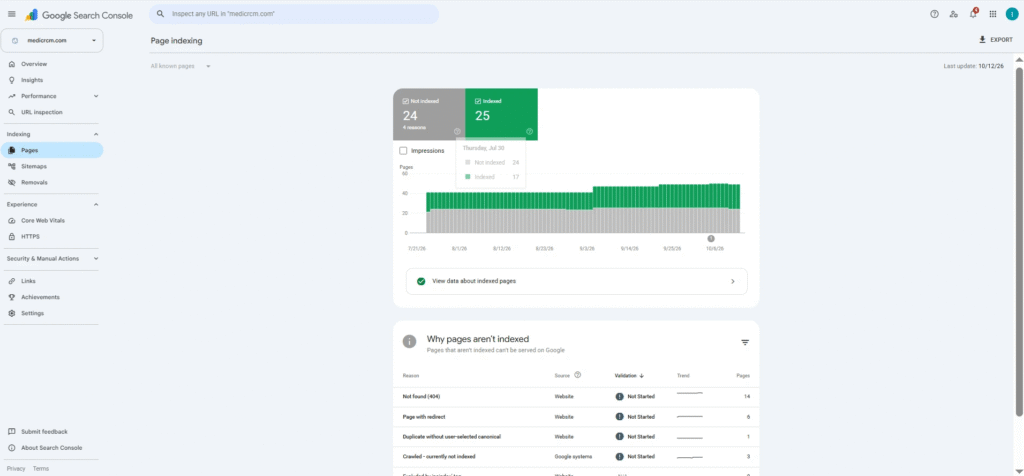
Google Search Console is the first tool to set up. It is a free Google service that helps you monitor and fix your site’s presence in search results. It confirms that Google can find and crawl your site, helps you fix indexing problems, shows which queries bring impressions and clicks, and alerts you to issues.
Use it to see which pages get clicks and which pages Google has not indexed. Keep one limit in mind: you must verify that you own the site, so you cannot use it on a competitor. Its “average position” is also an average, not a live rank checker.
Google Analytics 4
Search Console tells you how people find you. Google Analytics 4 shows what they do next. It reports sessions, traffic sources, landing pages, and conversions. It does not report rankings.
Connect it with Search Console to compare organic traffic with what visitors actually do on the page. The catch is setup. If tracking or consent settings are wrong, the reports will mislead you.
Bing Webmaster Tools
Bing Webmaster Tools is Bing’s version of Search Console. It is free and takes a few minutes to set up. It shows crawl, indexing, and performance data for Bing search.
It will not replace Google data. It is still worth adding because it gives a second view of your site’s health at no cost.
Free SEO Audit Tools to Find Technical and On-Page Issues
These free SEO audit tools answer one question: what is wrong with my site right now?
Ahrefs Free (formerly Ahrefs Webmaster Tools)
Ahrefs offers a free plan for websites you own. Its Site Audit scans for more than 170 technical and on-page SEO issues, and verified sites get 5,000 crawl credits per project each month. You can use it on an unlimited number of verified sites. ahrefs
The limit is that you can only analyze sites you can verify. Checking competing sites needs a paid plan. Use it to get a clear list of fixes for your own site.
Screaming Frog SEO Spider
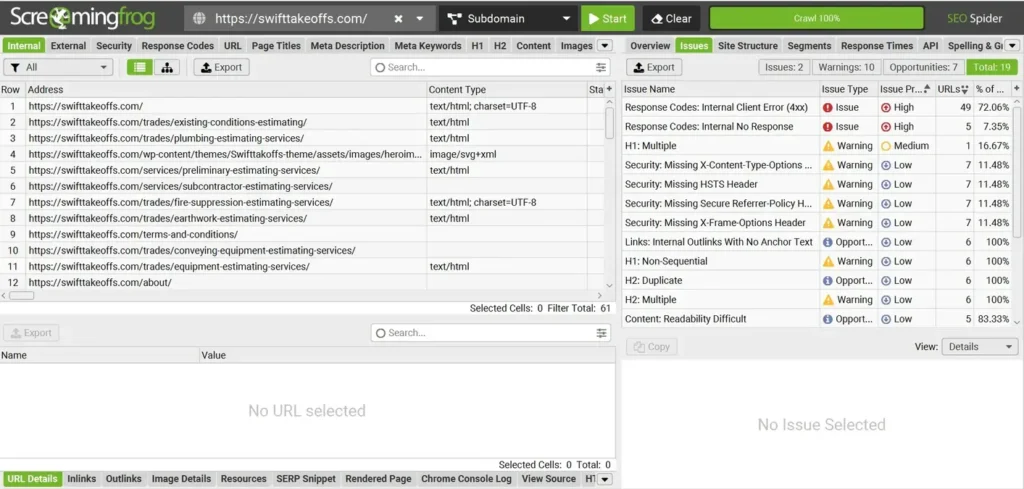
Screaming Frog is a desktop crawler. It visits your pages the way a search bot does and reports what it finds. The free version can crawl up to 500 URLs, and it finds broken links, errors, redirects, page titles, and metadata (Screaming Frog).
For most small sites, 500 URLs is plenty. A paid licence removes the limit and adds advanced features. It has a learning curve, so start with the broken links and missing titles reports.
Once you identify these issues, use our SEO Audit Checklist to review other important SEO factors and organize the fixes your website needs.
Google PageSpeed Insights
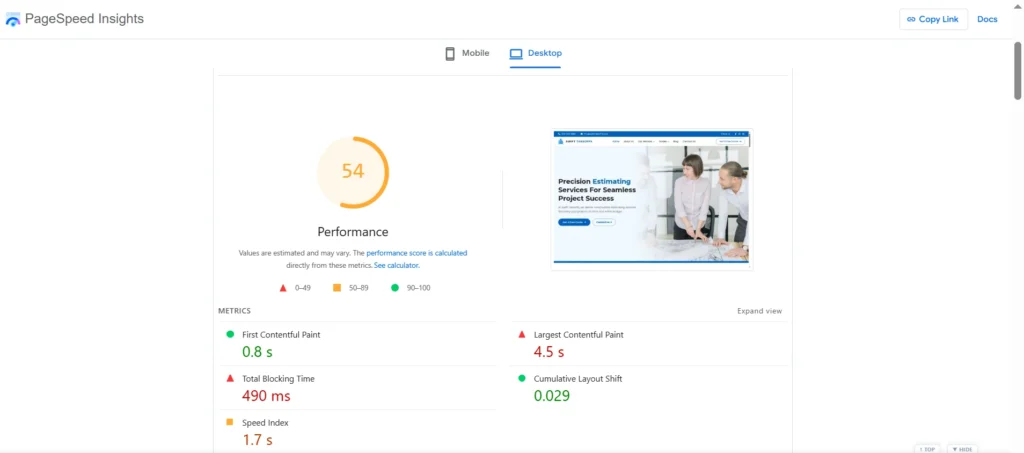
Slow pages frustrate visitors. PageSpeed Insights tests a URL on mobile and desktop and reports Core Web Vitals. These include Largest Contentful Paint (how fast the main content appears) and Cumulative Layout Shift (how much the page jumps around). It also lists fixes, such as oversized images.
It tests one page at a time. Lab scores can also differ from what real visitors see, so look at the field data when it is available.
Google Rich Results Test
If you add structured data (schema), test it here. The tool checks whether a page has markup that can qualify for Google’s rich results and flags errors. Passing the test means the page is eligible. It does not mean Google will show a rich result.
Free Tools for Keyword Analysis and Content Ideas
Google Trends
Google Trends compares how interest in topics changes over time and by region. It helps you choose between two phrases or spot seasonal demand. The numbers are relative. A score of 100 means peak interest in that comparison, not 100 searches.
For volume estimates, Google Keyword Planner is free with a Google Ads account. Without ad spend, it may show broad ranges instead of exact numbers.
Answer The Public and Also Asked
These tools show the questions people ask around a topic. AnswerThePublic groups autocomplete suggestions. AlsoAsked maps “People Also Ask” questions. Both are useful for outlines and FAQs.
Free searches are limited each day. The ideas are not proof of demand, so check promising ones in Search Console or Google Trends before you commit.
How Can You Check Your Website SEO for Free? A 5-Step Routine
You do not need all nine tools every time. Follow this order:
- Set up Search Console and Bing Webmaster Tools. Verify your site and submit your sitemap. This is your main source of search data.
- Run a site audit. Use Ahrefs Free or Screaming Frog. Export the list and fix broken links, missing titles, and redirect problems first.
- Test your top pages for speed. Run your homepage and two or three best pages through PageSpeed Insights.
- Review titles, descriptions, and headings. RankFable has free tools for these quick checks, including a SERP preview tool and a heading (H1 to H6) checker.
- Plan new content. Use Google Trends and AnswerThePublic to pick topics. Then track results in Search Console and Google Analytics.
Repeat the routine once a month. Small, regular fixes beat one big audit that you never repeat.
What Free SEO Analysis Tools Cannot Do
Free SEO analysis tools have clear limits. Most cap how much data you see. Few track rankings automatically, and most cannot show you a full backlink profile. When you outgrow them, that is the time to consider a paid plan.
There is another gap. Most of the tools above were built around classic search results. They do not tell you whether your site shows up in AI-generated answers. If you want a quick look, RankFable’s AI Visibility Checker scores a domain out of 100 for visibility in Google AI Overviews and Gemini, shows competitor insights, and suggests four keywords based on your content. Those suggestions are a starting point, not full keyword research. No tool can promise AI citations or rankings, so treat the score as one signal.
FAQs
What are the best free SEO tools?
For most websites, start with Google Search Console, PageSpeed Insights, Ahrefs Free, and Screaming Frog. They cover search data, speed, and technical issues without a subscription.
How do I find SEO issues on my website?
Run a crawl or audit. Ahrefs Free and Screaming Frog both list problems such as broken links, missing titles, and redirect issues. Then check Search Console for pages Google has not indexed.
Which free SEO tools help improve Google rankings?
No tool improves rankings by itself. Tools show you what to fix. Search Console, PageSpeed Insights, and a site audit give you the most useful fix lists. The improvement comes from acting on them.
Are free SEO tools good enough for a small website?
Yes, for most small sites. A free crawler, Search Console, and a speed test cover the basics. You may need a paid tool for automatic rank tracking, large crawls, or full backlink data.
How often should I run a website SEO check?
Once a month is a good habit for small sites. Check Search Console weekly for new errors, and run a full audit after big changes such as a redesign or migration.
Conclusion
You do not need a big budget to analyze your site. The best free SEO tools cover search data, technical audits, speed, and content ideas. Start with Search Console, add one audit tool, and follow the five-step routine each month.
When you are ready for more, explore RankFable’s free SEO tools or check your domain’s AI visibility with the checker above.